Max, what can you do?
Here's all of it, and where each part stands.
“Give it to me straight.”
“Margins slipped at two stores. Here's what happened and here's my plan.”
An owner, before the doors open
A general at your side
Maximus is his full name. Everyone calls him Max. He's commanding, calm and loyal. He tells you the truth, plans before the battle and stands with you in it.
- Every part of how he talks can be tuned by your business, at every level from the company down to a single store.
- His voice is a custom-designed Maximus voice, made for him.
- A Maximus voice, and a tone you setComing soon
“Max, where did we leave off?”
“Hi Dana. The walk-in order and your Thursday swap are still open.”
A shift lead, back after two days off
Max knows who's talking
Put a full table in front of him and he tells people apart. He knows who's speaking and what their role is, learns who's who over time, and picks up with each person right where they left off. In a meeting, he keeps track of who said what.
- Each person gets answers that fit their job, in the same conversation.
- The owner gets the numbers. The new hire gets the how-to.
- Knows who's talkingComing soon
Opt-in, or on where the law allows. A voice never approves anything.
“How do we close out at this store?”
A new hire, second shift
Max the coach, trained on your handbook
Add your handbook pages, closing checklists, policies and recipe cards, and Max answers from them on the job.
- On any screen, ask how something works or what to do next, and Max walks you through it.
- Ask about food cost, pricing, labor or inventory and get advice tied to your own numbers.
- Teach Max your handbookIn testing
- Ask Max how to do anythingIn testing
- Advice on food cost, labor, pricing and operationsComing soon
“No, we call that a large.”
An owner, correcting Max once
Max learns you and your store
Max knows who's asking and what their job is. Correct him once and it sticks. Say "remember that" and he does. You can see everything Max keeps and delete any of it.
- What Max remembers for you is yours. Only you see it.
- A manager can add store facts. An owner can add company facts.
- Knows who's asking and which screen they're onIn testing
- Memory you can see and deleteIn testing
“What did the landlord say in that email?”
An owner, between lunch and dinner
Max connects to your tools
Email, calendar, chat, Google Drive and the other apps you run on. Connect what you choose, at the level it belongs: you, a store, a brand or the whole company. Turn any connection off at any time.
- Ask for a report, a spreadsheet, a slide deck, an email or a text, and Max makes it from your real numbers.
- Weather, local sports and events feed the forecast for each store.
- Spreadsheets, documents, emails and textsIn testing
- Your email, calendar, chat and DriveComing soon
- Forecasts from weather, games and local eventsComing soon
“Maximus, how's tonight looking?”
A manager with flour on both hands
Talk or type, in English or Spanish
Say Max or Maximus, or press to talk when the line is loud. Start by voice and finish by typing in the same conversation.
- Press to talk is the default in the shop, because a live mic near guests is a choice you should make.
- A store can add its own wake word. Max and Maximus always work.
- Talk to Max, and hear him answerIn testing
- Say "Max" or "Maximus"In testing
- A live spoken conversationComing soon
“Refund that order.”
“That needs a manager. Sending it over with the details.”
A cashier, mid-rush
Your rules, at every level
Max can do only what the person asking can do, checked against their job, their store and your company's rules on every action. He asks first until you open it up, one job and one limit at a time.
- A PIN is never spoken. Max reads the action aloud and a person taps Approve.
- In a meeting Max reads nothing the brief doesn't name, because outsiders are listening.
- Conversations stay private to the person. Actions go in the audit log, like any other action.
- Max does the work, after you tap OKIn testing
- Set how far Max goes on his ownIn testing
Every level of the business, one Max
Max answers each person as who they are, with what their job lets them see. Here's what they can ask, and where each one stands.
- Owner “How did we do last week?” Live
- Manager “Who's on tonight?” Live
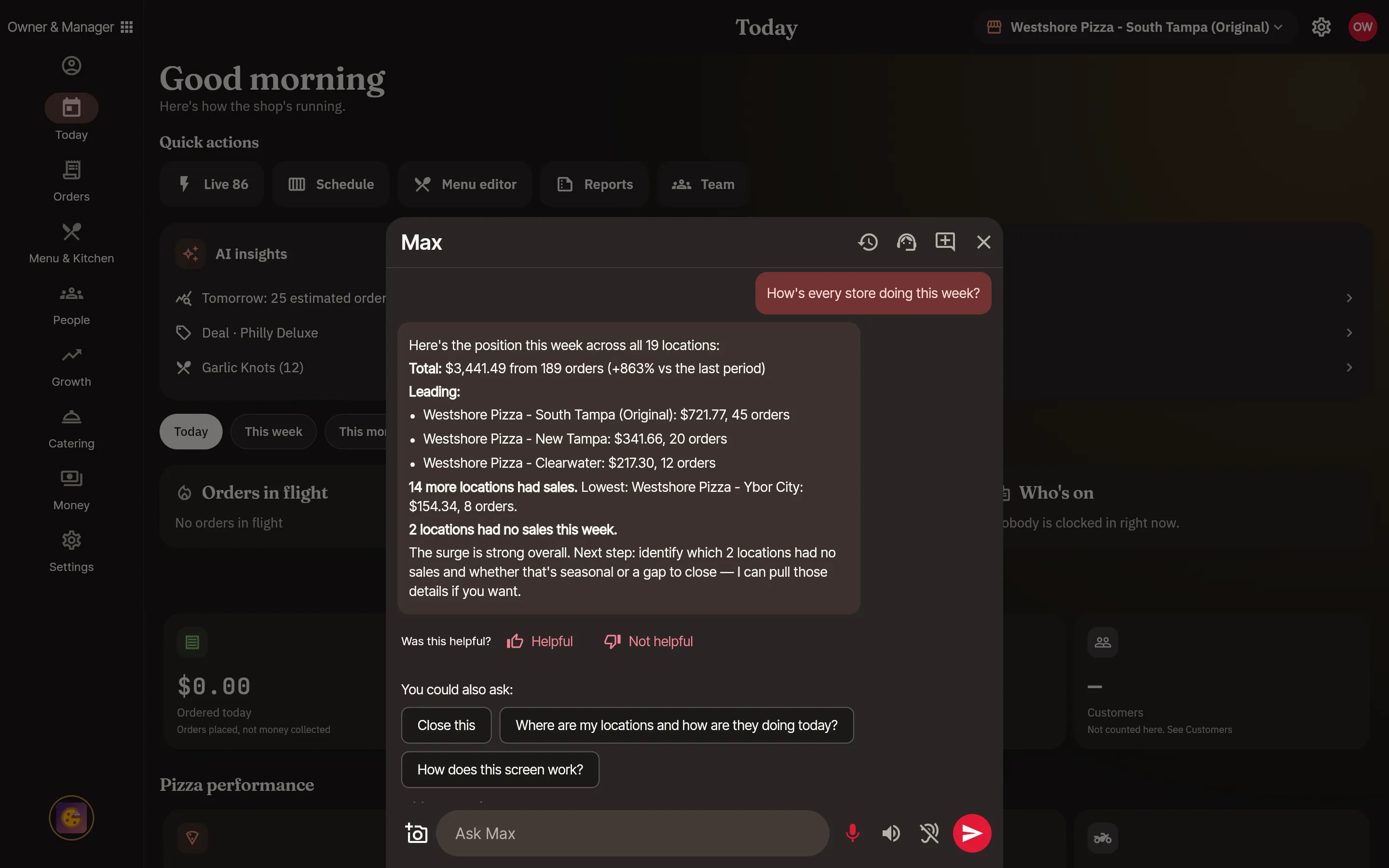
- Multi-store owner “How's every store doing this week?” In testing
- Bookkeeper “How does October compare with last October?” In testing
- Cook “What's next on the make line?” In testing
- Driver “How many runs are left?” In testing
- New hire “How do I void a ticket?” In testing
- Guest “What would you get for four people?” In testing
“How did we do last week?”
This part works today
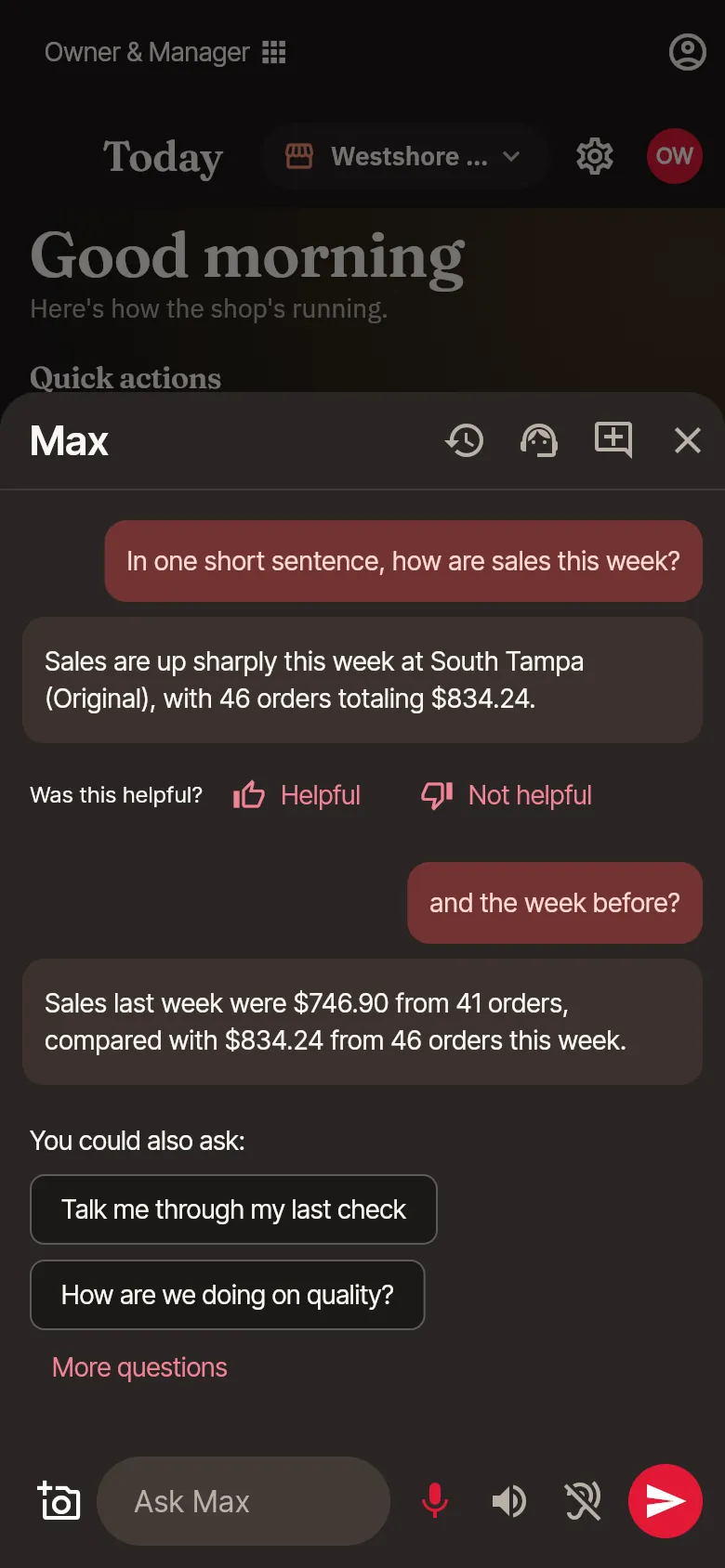
Type a question in the owner app and Max answers from your own numbers: sales, labor, who's on. Follow-up questions, any period you name and answers across every store are built and in testing now.
- Ask Max about sales, labor and who's onLive
- Follow-up questions in the same conversationIn testing
- Any period you ask aboutIn testing
- Answers across all your storesIn testing
Where every feature stands today
Every claim on this site maps to a line here. When a feature ships, this list changes first.
Live
Works in the product today, proven end to end.
- Ask Max about sales, labor and who's on
In testing
Built into the product. We're still testing it end to end.
- Follow-up questions in the same conversation
- Any period you ask about
- Answers across all your stores
- Knows who's asking and which screen they're on
- Max does the work, after you tap OK
- Set how far Max goes on his own
- Undo what Max did, and a daily list of it
- Three decisions every morning
- What if? on your own history
- Talk to Max, and hear him answer
- Say "Max" or "Maximus"
- Max in your meetings, held to your brief
- Teach Max your handbook
- Ask Max how to do anything
- Max shows you where, and can press it for you
- Talk to a person at support, from Max
- Memory you can see and delete
- Spreadsheets, documents, emails and texts
- Plan the week with Max
- Max for cooks
- Max for drivers
- Guests can ask Max, and order
- Max checks the work against your standard
Coming soon
We're building it. You can't use it yet.
- Knows the order, table or item you have open
- Routines that run on their own
- One timeline of what happened, and why
- A live spoken conversation
- Start Max from Siri or Google Assistant
- Knows who's talking
- A Maximus voice, and a tone you set
- Max joins your phone and video calls
- Your conversations, on every device
- Advice on food cost, labor, pricing and operations
- Your email, calendar, chat and Drive
- Forecasts from weather, games and local events
- A camera that checks each pie before it's boxed
- Help moving from your old system
- The same Max in every app we build
The rest of the POS
Everything it does, by role. Every feature, by who uses it, is on the page below.
What Max does for you
An assistant that answers is the start. Max does the work around the answer, and stays beside you when it counts.
- Joining your supplier call, held to a brief you wroteComing soon
- Talking in the room while he coaches you privatelyIn testing
- Preparing you from your calendar and your Google DriveComing soon
- Answering from your own handbookIn testing
Every POS app we build gets Max.
Max isn't a PizzaOS add-on. We're building him once, so the same Max comes to every POS app we make, in that trade's own words. He learns each trade, and he never mixes one business's data with another's.
Coming soonWhere do you want to start?
- Book a demo
Pick a time with a person.
- Try the demo
Open a demo shop and press around.
- Sign up
Not open yet. Here's how to get in first.
Ask Max anything about PizzaOS.